What Is Screen Printing Textile Ink and How Does It Work?

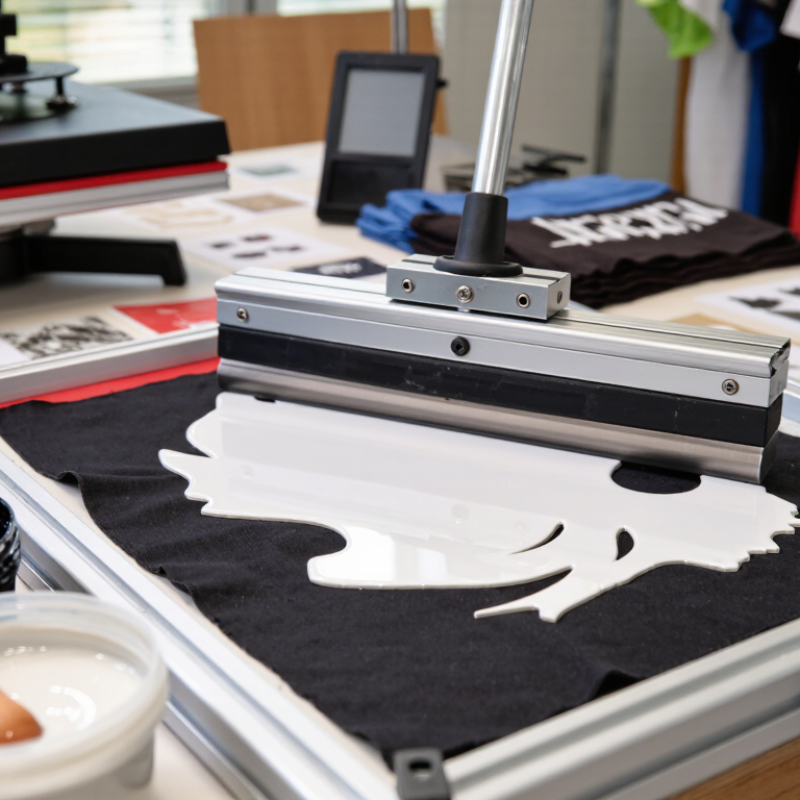
Screen Printing Textile Ink turns a simple fabric graphic into a durable, tactile surface. The process pushes ink through a prepared mesh stencil, while a squeegee controls pressure, deposit, and edge definition. The result depends on more than the ink itself. Fabric type, mesh count, curing temperature, humidity, and operator technique all matter.

Industry data shows why this process remains relevant. Smithers’ report, The Future of Digital Textile Printing to 2027, identifies rising demand for customized, short-run textile production. Grand View Research also reports continued growth in the global textile printing market, driven by apparel, sportswear, home textiles, and promotional products. However, these reports often group screen printing with digital and rotary methods. That limitation deserves attention. Market figures do not always isolate Screen Printing Textile Ink accurately.

Scott Fresener, a recognized T-shirt screen-printing educator, once stated, “Screen printing is a process, not a product.” His point remains practical. A white ink layer may look bright on a black cotton shirt, yet poor curing can cause cracking after washing. A soft-hand water-based ink may feel comfortable, but it can dry inside the screen during production. Small details become visible quickly.

This guide explains ink chemistry, curing behavior, substrate compatibility, and application control. It also compares plastisol, water-based, discharge, and silicone systems. Real production conditions can be messy. Testing is essential. Manufacturers’ technical data sheets, laboratory wash tests, and experienced print operators should guide final decisions. The best ink is not universally best. It is the ink that matches the fabric, artwork, equipment, and expected service life.
What Is Screen Printing Textile Ink and How Does It Work?

Screen-Printing Textile Ink: Plastisol and Water-Based Formulations

Screen-printing textile ink transfers color through a stencil onto fabric. The squeegee pushes ink across open mesh areas. Heat then fixes the printed layer. Textile Exchange’s 2024 Materials Market Report recorded 124 million tonnes of global fiber production in 2023. That scale makes ink selection more consequential than it first appears.

Plastisol Ink

Plastisol ink contains PVC resin and plasticizers. It remains wet until heat activates the film, usually around 150–170°C. The cured layer sits visibly on the fabric, producing strong opacity and sharp details. It suits dark cotton garments and repeated production runs. Grand View Research estimates the global screen-printing inks market was worth about 3 billion US dollars in 2023, with growth above 5% annually through 2030. That expansion does not prove every plastisol process is efficient.

Water-based Ink

Water-based ink uses water as its main carrier. It absorbs into fibers, leaving a softer hand and less surface buildup. Drying depends heavily on airflow, humidity, and dryer temperature. On dark fabrics, extra layers may be necessary. That can increase energy use and production time. Smithers’ textile-printing research highlights shorter runs and customization as continuing market drivers. In practice, a test print matters more than a perfect specification sheet.

I once underestimated fabric absorbency; the color looked bright under shop lights, then faded after washing. The lesson is uncomfortable: “eco-friendly” is not a complete performance test.

Check cure temperature, wash durability, opacity, and the final feel before approving a production batch.

Screen Setup: 90–160 TPI Mesh Controls Ink Deposition

Screen printing textile ink moves through mesh openings when a squeegee forces the stencil against fabric. Mesh count, measured in threads per inch (TPI), controls how much ink reaches the surface. A 90 TPI screen has larger openings and usually deposits a heavier ink film. A 160 TPI screen provides finer control, sharper edges, and less ink transfer.

The practical range is wider than it first appears. For bold lettering or opaque light-colored ink, printers often begin near 90–120 TPI. For halftones, thin lines, and softer prints, 140–160 TPI can reduce dot gain and surface buildup.

However, TPI alone cannot predict ink volume. Thread diameter, mesh tension, stencil thickness, ink viscosity, and squeegee pressure also change deposition. That detail matters.

Small changes show quickly. Too much ink can flatten fine details and create a heavy hand feel. Too little ink may produce weak coverage after curing. Industry testing guidance commonly links higher mesh counts with controlled deposits, but shop conditions remain decisive. I would not treat 160 TPI as automatically superior.

Textile Exchange reported global fiber production at 124 million metric tonnes in 2023 in its Materials Market Report 2024. That scale increases pressure for repeatable, material-efficient printing. A measured setup helps. Record the mesh count, thread specification, stencil thickness, and wet print appearance for each job. Sometimes, the first setting is still wrong. Reflect on the result before changing everything.

Squeegee Transfer: 70–80 Shore Hardness and a 15–25° Angle

What Is Screen Printing Textile Ink and How Does It Work?

Screen printing textile ink moves through open mesh areas when a squeegee presses and travels across the stencil. The ink then settles onto fabric fibers and forms the printed image after curing. Its performance depends on ink viscosity, mesh count, fabric texture, and pressure. Cotton may absorb ink differently from polyester or blended materials.

Squeegee hardness strongly affects ink transfer. A 70–80 Shore blade offers a useful balance between pressure and control. Softer blades deposit more ink, while harder blades can produce sharper edges. For many textile jobs, a 15–25° squeegee angle helps the blade contact the mesh efficiently. Keep the angle steady. Uneven pressure can create pale edges, pinholes, or excessive ink buildup.

A practical setup begins with moderate pressure and one smooth stroke. The blade should bend slightly, not collapse against the screen. I watch the ink bead closely as it moves; its shape often reveals pressure problems before the print does. A rough fabric may need more ink, but adding pressure is not always the answer. Sometimes a slower stroke improves coverage. My own test prints have shown that this range is only a starting point, not a guarantee. Mesh tension, stencil thickness, and room temperature can change the result. Check opacity after curing, not only while the ink is wet. A print can look strong on the press and still feel weak after washing.

What Is Screen Printing Textile Ink and How Does It Work? – Squeegee Transfer: 70–80 Shore Hardness and a 15–25° Angle
Process Area Parameter Typical Working Range How It Affects Ink Transfer Practical Control Point
Ink Selection Water-based textile ink Air-drying tendency; heat cure commonly around 150–170°C Soaks partly into the fibers and can produce a soft hand feel. Prevent ink from drying in the screen; maintain adequate humidity and clean the screen promptly.
Ink Selection Plastisol textile ink Common cure range: approximately 150–170°C, depending on the ink system Forms a flexible film on top of the fabric and provides strong opacity. Measure the ink-film temperature, not only the dryer air temperature, to confirm complete curing.
Ink Selection Discharge ink Typically heat activated; often processed around 150–170°C Lightens or replaces the fabric dye while depositing color into the fibers. Test each fabric because dye chemistry, moisture, and curing conditions affect discharge performance.
Screen Preparation Mesh count Approximately 32–55 threads/cm for many standard textile prints Controls ink flow, detail reproduction, and the amount of ink deposited. Use lower mesh counts for heavier ink deposits and higher mesh counts for finer detail.
Screen Preparation Stencil thickness Commonly about 10–25 micrometres of emulsion thickness above the mesh A thicker stencil generally deposits more ink and increases print opacity. Keep coating thickness consistent across the image area to avoid uneven coverage.
Squeegee Setup Squeegee hardness 70–80 Shore A Provides a balanced combination of ink control, edge definition, and fabric conformity. Use softer rubber for uneven or textured fabric and harder rubber for fine detail or sharper deposits.
Squeegee Setup Squeegee angle 15–25° relative to the screen surface A lower angle can increase ink deposit; a higher angle can reduce deposit and improve control. Keep the angle consistent during the stroke and adjust only when deposit or detail requires it.
Squeegee Setup Squeegee pressure The minimum pressure needed to clear the stencil Excess pressure can force ink beyond the image edge and reduce print sharpness. Increase pressure gradually until the print clears without leaving unprinted stencil areas.
Squeegee Setup Stroke speed Often approximately 100–300 mm/s, depending on equipment and ink viscosity Affects ink release, edge definition, and the consistency of the printed film. Use a slower stroke for viscous or highly opaque inks and a faster stroke when excessive deposit occurs.
Screen Contact Off-contact distance Commonly about 2–5 mm for textile screen printing Allows the screen to snap away from the fabric after the squeegee passes. Set the smallest distance that prevents screen sticking while maintaining clean release.
Printing Flood stroke Light pressure; ink spread across the image area Places ink over the open stencil openings before the printing stroke. Avoid forcing ink through the mesh during flooding unless the process specifically requires it.
Printing Print passes Usually one print stroke; two or more for higher opacity Additional passes can increase coverage but may soften fine details. Use a consistent stroke direction, pressure, and speed for every garment in the batch.
Multi-Layer Printing Flash drying between layers Surface-dry condition, commonly around 90–120°C for a short cycle Allows another ink layer to be printed without excessive mixing or lifting. Avoid over-flashing, which can reduce adhesion between layers or partially cure the lower layer.
Final Curing Cure verification Confirm the ink film reaches the supplier-specified cure temperature and dwell time Ensures adequate wash durability, flexibility, and adhesion to the textile. Verify with temperature-sensitive labels, a temperature probe, and wash testing where appropriate.
Quality Control Print appearance Even coverage, sharp edges, consistent color, and no pinholes Indicates that mesh, stencil, ink viscosity, and squeegee settings are working together. Inspect the first approved print and compare subsequent garments against the approved sample.
Typical ranges are provided for general textile screen-printing practice. Actual settings depend on fabric type, ink formulation, mesh geometry, stencil thickness, equipment, and the ink supplier’s technical instructions.

Curing Stage: Plastisol Ink Reaches Approximately 160°C

What Is Screen Printing Textile Ink and How Does It Work?

During curing, plastisol ink reaches approximately 160°C, allowing its resin and plasticizer system to form a durable film. The printed garment must reach the required temperature throughout the ink layer, not only at the dryer surface. A temperature probe or heat-sensitive strip can verify this point.

Industry testing guidance commonly recommends checking both curing temperature and dwell time. The exact setting depends on ink thickness, fabric weight, dryer airflow, and conveyor speed. The 2024 Textile Exchange Materials Market Report estimated global fiber production at 124 million tonnes in 2023. That scale makes reliable printing and reduced rework increasingly important. Still, 160°C is not a universal guarantee. Thick white deposits may need longer exposure, while heat-sensitive fibers can shrink or discolor.

Tips: Measure the ink film directly. Do not trust the dryer display alone. Wash-test a sample after curing. A cracked print may indicate under-curing, but excessive heat can also damage the fabric. I have found that slower conveyor settings often improve consistency, although they may increase energy use. This trade-off deserves regular review. Record temperature, belt speed, ink thickness, and fabric type for each production run.

What Is Screen Printing Textile Ink and How Does It Work?

Plastisol ink is typically heated through several curing milestones. It may begin to gel at approximately 110–130°C, while complete fusion and curing commonly require an ink-film temperature of about 160°C (320°F). The actual result depends on ink formulation, printed thickness, conveyor speed, and dryer conditions.

Quality Testing: Wash Fastness and Adhesion Under Textile Standards

Screen printing textile ink forms a colored film on fabric after curing. Its performance depends on ink chemistry, fabric fibers, print thickness, and curing conditions. Quality testing should begin with a controlled sample, not a finished production batch. I record fabric type, mesh count, squeegee pressure, drying temperature, and curing time.

Wash fastness shows how well the print survives laundering. A laboratory may use methods such as ISO 105-C06 or AATCC 61, following the required wash cycle and detergent conditions. Inspectors check fading, color transfer, cracking, and surface loss. Ratings should be recorded with a gray scale or approved visual standard. Cold washing alone can hide weak curing.

Adhesion testing examines whether the ink remains attached to the textile surface. Tape tests, such as ASTM D3359 adaptations, may provide useful evidence, but woven and stretchy fabrics can make results inconsistent. A gentle stretch after washing often reveals lifting around sharp edges. The print should remain flexible, without peeling or flaking. Small details matter.

In practical production, I test before and after washing. One sample is never enough. I have seen prints pass dry adhesion tests but fail after repeated laundering. That result usually points to incomplete curing, excessive ink thickness, or poor fabric preparation. Standards improve reliability, but human inspection still catches defects that numbers miss.

Request More Information