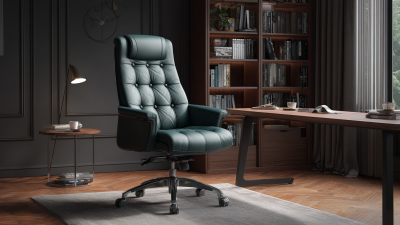
7 Tips for Choosing the Best Home Office Chair for Your Business
A home office chair can shape more than comfort. It affects how easily you focus, how often you shift position, and whether your back feels tired by late afternoon. For a business owner, those details matter. A chair used through client calls, invoices, and planning sessions should fit both the person and the work.
Ergonomics researcher Dr. Alan Hedge is often associated with the advice, “The best posture is your next posture.” The idea is useful: even a well-adjusted chair cannot replace movement. Stand, stretch, and change position when you can. The chair still matters. Look for adjustable seat height, supportive lumbar shaping, and armrests that let your shoulders relax. Check the seat depth, too; a seat pressing behind your knees is a poor fit, however polished it looks.
This guide explores seven practical tips for choosing the best home office chair for your business, from fit and adjustability to materials and budget. Try a chair before committing, if possible, and notice how it feels after an hour—not just during a quick test. Specifications help, but they do not tell the whole story. And a small confession: it is easy to overvalue sleek design when a deadline is near. Comfort deserves a closer look.

Define the Chair’s Role in Your Home Office
Before comparing upholstery or price, decide what the chair must do in your home office. Will you sit for long stretches at a desk, switch between meetings and paperwork, or use the room only occasionally? The U.S. Bureau of Labor Statistics’ 2023 American Time Use Survey reports that full-time workers spent an average of 8.1 hours working on days they worked. That figure covers work in all settings, not just desk time, but it shows why daily use matters. A chair for occasional email does not need the same adjustments as one supporting hours of focused work.
Picture your actual setup: feet on the floor, screen at eye level, and enough space to move. OSHA’s Computer Workstations eTool recommends an adjustable chair with back support and a seat height that lets your feet rest flat. Those details help define the chair’s job; they are not a substitute for trying it in your own workspace. If you share the room, prioritize quick adjustments. For a compact desk, check the chair’s footprint and whether its arms fit beneath the desktop. Small detail. It can change how often you use the chair. I once assumed a soft seat meant comfort; after a long afternoon, that assumption felt shaky. A short trial at your desk may reveal more than a feature list.
Assess Ergonomic Fit and Adjustability
A well-fitted chair should support the way you actually work, not just look comfortable in a showroom. OSHA’s computer workstation guidance recommends adjusting seat height so feet rest flat and thighs stay roughly parallel to the floor. Start there. Then check that the backrest supports your lower back without pushing your shoulders forward. You should be able to sit close to your desk, with elbows near your sides and wrists relaxed. Small adjustments matter.
Tips: Before buying, test the chair at your own desk if possible. Raise or lower the seat until your feet are stable; add a footrest if they dangle. Adjust the backrest so it follows your lower-back curve, and confirm the armrests let your shoulders drop naturally. A useful test is typing for ten minutes, then checking for pressure behind your knees or a stiff neck. It is easy to miss those signs during a quick showroom sit.
Treat adjustability as a practical requirement, especially if several employees share a chair. The U.S. Bureau of Labor Statistics reported a median of eight days away from work for workplace injuries and illnesses in 2023; that figure covers many causes, not chair-related cases alone. Still, it’s a reminder that comfort deserves attention. I’ve found that people often overlook seat depth. That’s not always obvious. Leave a small gap between the seat edge and the backs of your knees, then reassess after a full work session.
Compare Materials, Durability, and Maintenance
A home office chair should survive daily use, not merely look polished in a product photo. Mesh allows airflow, but dust can settle between its fibers and resist quick wiping. Upholstery feels warmer and can hide minor scuffs, though spills may leave stains. Leather-like surfaces wipe clean easily, yet may show scratches or feel sticky in a warm room. ANSI/BIFMA X5.1, an industry office-chair standard, includes repeated-load durability testing, including a 100,000-cycle seat test. That figure reflects controlled testing, not a guarantee of service life in your home.
Tips: Before buying, press the seat edge and inspect seams, casters, and adjustment handles. Ask how to clean the material and whether replacement parts are available. A chair with a removable, washable cover may save effort, but check washing instructions first. Small details matter.
For a shared workspace, choose materials that tolerate frequent wiping and look for clear care guidance. A soft cloth and mild cleaner are often safer than harsh chemicals; always follow the maker’s instructions. Mesh may need gentle vacuuming, while fabric benefits from prompt blotting after spills. Durability also depends on weight limits, floor type, and adjustment habits. I once assumed a smooth surface meant easy upkeep; dust around the seat seams proved otherwise.
Match Chair Features to Your Work Style and Space
A good home-office chair should fit the work, not just the room. The Occupational Safety and Health Administration’s Computer Workstations eTool recommends placing a monitor about 20–40 inches from the eyes, with its top at or below eye level. Use that range to test your setup: sit back, keep the screen readable, and check that your feet rest flat. A compact desk may call for a chair with a smaller footprint and arms that slide beneath it. If you switch between calls, typing, and paperwork, adjustable seat height and back support are more useful than a long list of extras. Comfort is personal, though; a chair that feels right for ten minutes may not feel right after a long morning.
Tip: Match the chair to your routine. For keyboard-heavy work, look for adjustable seat height and lumbar support; for a shared workspace, prioritize easy adjustments. Measure the desk opening before buying, including the space needed to move the chair back. OSHA’s guidance also highlights keeping frequently used items within easy reach, so consider whether armrests obstruct your desk or whether the chair lets you sit close enough. Test the fit with your actual desk if possible. Small details matter. I once underestimated how much a thick cushion changed my seated height; it made the desk feel suddenly too tall. Recheck the fit after a few workdays.
Evaluate Cost, Warranty, and Long-Term Value
When comparing home office chairs, look beyond the sticker price. A chair used for six hours each workday accumulates about 1,500 hours of use in a year. A low-cost model may seem economical, but worn cushioning or a loose adjustment mechanism can make replacement costs arrive sooner than expected. Ask what the warranty covers, how long it lasts, and whether labor and replacement parts are included. Read the exclusions carefully. They matter.
Use reported injury data as context, not proof that one chair prevents injuries. The U.S. Bureau of Labor Statistics recorded 2.6 million nonfatal workplace injury and illness cases in private industry in 2023. That figure is not specific to home offices or chairs, but it underscores why employers should take workplace comfort seriously. Compare chairs by expected service life: divide the purchase price by the years you realistically expect to use it, then add likely repair costs. A longer warranty can reduce financial uncertainty, but it does not guarantee comfort or durability. Try the chair, check whether the seat height suits your desk, and note any pressure behind your knees after sitting. I have seen people focus on warranty length and overlook fit. That is an easy mistake. For a business purchase, document the warranty terms and review them alongside cost per year, adjustment options, and replacement-part availability.
| Tip | What to Evaluate | Practical Guidance | Cost and Long-Term Value |
|---|---|---|---|
| 1. Set a realistic budget | Compare the total purchase cost, including delivery, assembly, and any required accessories. | As an illustrative U.S. planning range, task chairs may cost roughly $100–$300, while chairs with more adjustment options can cost $300–$800 or more. Prices vary by retailer, materials, and features. | Compare cost with expected service life and daily use, not just the initial price. These ranges are estimates, not fixed market prices. |
| 2. Check the warranty carefully | Review the warranty period and which parts are covered, such as the frame, mechanism, upholstery, and casters. | Warranty terms differ considerably. Check exclusions, weight limits, required proof of purchase, and whether shipping or labor is included. | A longer warranty can reduce repair risk, but it does not guarantee that every component is covered or that a claim will be cost-free. |
| 3. Prioritize adjustable support | Look for adjustable seat height, back support, armrests, and a tilt or recline control suited to the user. | When seated, aim for feet to rest flat on the floor or a footrest, with knees near a right angle and shoulders relaxed. | Adjustability can help the chair fit different users and workstations, potentially making it useful for longer before replacement. |
| 4. Match the chair to daily use | Estimate how many hours the chair will be used and whether it will serve one person or multiple employees. | For frequent, extended use, test comfort and adjustment range where possible. A chair used occasionally may not need the same feature set as a full-time workstation chair. | Consider cost per year of expected use: divide the purchase price by the number of years you reasonably expect the chair to remain serviceable. |
| 5. Assess materials and construction | Inspect the frame, base, casters, stitching, upholstery, and adjustment controls. | Confirm that the product information identifies materials and care requirements. Check that the base feels stable and that controls operate smoothly. | Durable, repairable components may lower replacement frequency. Avoid assuming that a higher price alone proves better durability. |
| 6. Check fit before buying | Compare seat height, seat depth, width, and armrest range with the intended user's body and desk setup. | Make sure the seat does not press against the back of the knees and that the user can sit back against the backrest. Check return terms if an in-person trial is not possible. | A well-fitting chair is more likely to remain usable; return shipping and restocking fees can add to the true cost of a poor fit. |
| 7. Plan for maintenance and replacement | Find out whether common parts, such as casters or arm pads, can be replaced and whether care instructions are provided. | Keep the receipt and warranty information, follow cleaning guidance, and periodically check fasteners and moving parts for wear. | Include likely maintenance, replacement parts, and eventual disposal or replacement in the ownership-cost estimate. |
Related Posts
-
China's Leading Factory Brings You the Best Home Office Chair for Global Export
-
Top 10 Best Home Office Chairs for Ultimate Comfort
-
2026 Best Desk Chair Types for Global Buyers?
-

10 Best Home Office Chairs for Ultimate Comfort and Productivity in 2023
-

How to Choose the Perfect Office Chair for Your Work Environment
-
10 Best Office Furniture Liquidators for Global Buyers?